Wednesday, March 24, 2021

Animating a dragon ~ part four ~ discussion and analysis of dragon animations in media.

 While I'm animating a dragon, mostly inspired by real life references such as bats and bears, I thought I'd take a blog post to talk about how dragons have appeared in movies, video games and tv shows. This is because I want to talk about dragons and it gives me an excuse to watch films with dragons in.

To start off with, I'm going to talk about a film series: How to Train Your Dragon.

Produced by Dreamworks, however this isn't Dreamworks first time animating a dragon. In 2001, Dreamworks produced the masterpiece that is Shrek.


In Shrek, it appears that for the most part, the dragon moved somewhat similar to Donkey, with no real noticeable reference to anything. However, Shrek is still a fantastic movie, albeit one I won't be going to for dragon reference.


Perhaps due to dragons having more significance in the plot of How to Train Your Dragon, a lot more thought was put into the dragons and their movement. Throughout the film we have movements similar to how cats move as well as dogs. However, one part I took interest in especially was the flight. 
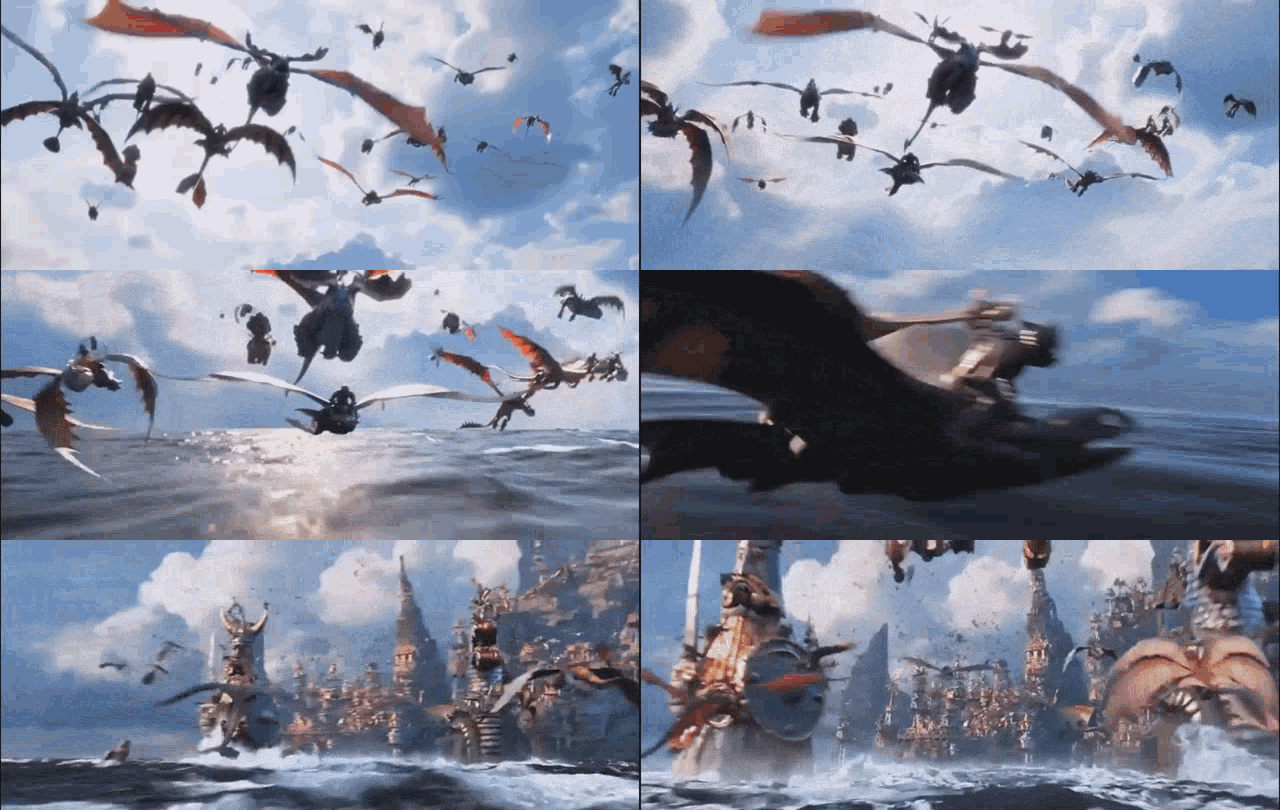


Here we can see that the flight is somewhat bat like, with the wing curling inwards as it is brought towards the body and upwards. However, unlike a bat, the wings, on all of the dragons, only flap a few times before stretching out to glide. This kind of flight is seen in another film series, The Hobbit.


Here we can see the dragon Smaug diving before gliding, we can see that coming out of the dive, Smaug only slightly adjusts his wings, compared to really flapping them. 


Here we can see a shot from HBO's Game of Thrones, where the same sort of flying is achieved. Lots of gliding is going on.


One of the earliest films to have 3D dragon animation was Dragonheart, while the dragon animations aren't quite the polish we'd expect nowadays, they are still definitely enjoyable and have their own merit. Yet again, the same idea of a few flaps and gliding is employed however.


Yet again, the same flight style is used in the Harry Potter film series.


And again in the Dragon Prince Netflix series...


And in the Spyro video games...


The video game World of Warcraft cycles between either flapping or gliding with every winged dragon, so is yet again, basically the same method of flight.


We can see from this that it's apparently generally agreed that dragons all fly in this manner. Now, while this does make sense, massive creatures would take a lot of energy to be flapping constantly, it would make sense that they would try to move as much air with as little effort, hence why realistic styled dragons, like Smaug, are stylised to have such large wingspans. Now, while the general movement of wings are very similar across all dragons that I've talked about here, they aren't all the same. A lot of the dragon animations, especially the more realistic and detailed animations, have different ligaments along the wing bending when flapping, as well as having slight adjustments when gliding.

From this research, it seems apparent that along with flapping animations, I will also need to do at least a gliding animation, however if I have time, I would also like to experiment with other animations to see what other flying animations I can create that are unique without looking unnatural.

Friday, March 12, 2021

Animating a Dragon ~ part three ~ animating a bat-like dragon flight cycle.

 Animating a flight cycle

This week, I'm starting the animation of the dragon. Relating to the last post, this will be a bat-like flight cycle.

First, I'll animate the wings, getting them into key poses and then in-betweens. Afterwards I will then animate the head, body and finally tail. The reason for animating it in this order is that all of the motion that the dragon is doing is in the wings, everything else is to support and to power that movement.


Here you can see I animated one wing and then the other, I am quite proud of this wing movement as it feels powerful and well timed, the curling inwards almost grabbing at the air adds a sense of animalistic and feral behaviour.


Here you can see I have animated the head movement as well as the legs, the head movement feels a bit awkward.  


Here I have worked on the head movement more, this makes it more in time with the wings, as well as add momentum to the movement.


Here I have worked on the tail movement, I had difficulty getting the tail movement to work well, and I'm still not completely happy with this movement, however I do feel it makes the movement seem more feral which is something that works quite nicely with a dragon, as well as being something you don't often see with dragon animations.


Now that the tail movement is done, I added additional movement to the torso and shoulders, finishing the animation. I feel that this flying animation, while not entirely bat like, is definitely one that feels natural and that I am proud of.

One thing I tried here was using playblasts instead of gifs, which work well for see a rough render of the animation, however due to not being able to loop, has it's drawbacks, in future WIP posts, I will try to include more of a mix.


Tuesday, February 16, 2021

Animating a Dragon ~ part two ~ beginning research

 
Due to how much of a case study I would like this to be, I plan to conduct extensive research over the next several weeks.

This week, I shall be focusing on bat flight.

This is one of the creatures I would like to use as inspiration for animation, because while Dragons appear closest to lizards, the bone structure of their wings, especially in the case of the rig I'm using, seem closer to that of a bat than a bird or a flying lizard of anything kind (not that they really exist, more gliding lizards).


The wing movements of bats can be a little too fast to easily see, however slowmotion videos and gifs are very useful in allowing us to see how bats move their wings to fly.


From this we see that generally the tip of the wing is brought behind the shoulder and then down and in front of both the head and shoulder. Looking further into this, we can see that as the wing is bought up, the different bones along the wing, which somewhat resembles hands, are curled inwards but as the front of the wing is rotated downwards, these bones unfurl again.

We can also the body is almost at an 45 degree angle to the head, something that may be worth exploring with the dragon rig.

Another thing of note with this is how the legs are used in this flight, now while with dragon rig does not have any of the wing connected to the legs like how this bat does, I think it would still be an interesting and potentially successful thing to see what the dragon rig looks like with similar leg motion when in flight.

While I am uncertain if I will animate a walk/run animation with this dragon rig due to wanting to focus mainly on the flight, it is still worth analysing how a bat might walk/run in case I find myself having time to animate one for this project. 


Here we can see that a bat perfects a hot, similar to how to a dog might run however due to it's short legs and very long arms, this becomes a hop. Having short legs and very longs arms is something that a lot of dragons also suffer from, so this type of run could be very interesting, especially if adding the additional weight that a dragon would have. This has potential to create quite an intense and scary run with the dragon, however it also has a risk of coming across as "goofy".

Next post, I plan to either animate a "bat-like" flight cycle or to analyse a bird's flight cycle, espiecally a big bird like a Buzzard. 


Thursday, February 4, 2021

Animating a Dragon ~ part one ~ introduction.

Intro


For module GAM250, I have chosen to animate a dragon. However not just a simple showreel, I would like to delve into the research side a lot more than usual and make this somewhat a "case study".

Over the next couple months, I will be animating a dragon taking inspiration from real life creatures as well as reviewing and analysing cases where dragons have already been animated, such as How to Train Your Dragon and The Hobbit films. 


The Rig

Due to wanting to focus purely on the animation side, I will not be able to rig a dragon of my own, so I shall be using this rig: https://truongcgartist.artstation.com/store/1Vlw/maya-dragon-rig-jaemin-dragon


I have chosen this rig as it has plenty of controllers, along with Set Driven Keys for the wings, allowing for the wings to be furled and unfurled easily. 


Another reason for using this rig was that it has IKFK controllers on it's wings, legs, head/neck and tail, which is another very useful feature.

The rig also features controllers for animating wind in the skin between the bones in the wings.


A big bonus of this rig is that it can be found at the student-friendly price of free! However paying $1 for it is more than worth it as it is a great rig. 


Sunday, November 1, 2020

Facial Controllers

 Week 5

This week, the final week working on this rig, we went about making controllers, as well as creating Set Driven Keys.

I started by creating a simple circle for use as a face controller, I also created two smaller squares for the eyes. However, due to the background being a dark blue, these were hard to see.

To fix this, I changed the colour of the controllers, this was done by going into the attribute editor tab, and then underneath Drawing Overrides.


For the eyes, I set up Aim constraints, bound to the eye controllers, this meant that the eye would point at the controller, I repeated this for both of the controllers and both eyes.

I then created an oval and parented the eye controllers to this, this is because eyes often point in the same direction. The separate eye controllers still allowed for the eyes to move separately if needed however.

After the controllers, I then selected the face controller, and went about creating Set Driven Keys, this would allow for a simple slider to be used for expressions such as smiles etc.
First the attribute was added, with a minimum of 0 and a max of 10, a set drive key was then added, with the slider at 0, all of the joints were keyed. 

With the slider then set at 10, the joints were moved into position, and then all of the joints were keyed again. This allowed for the slider to be used to create these emotions, with the numbers between 0 and 10 serving as a way to get in between the extremes of the emotions.

Happy
Sad

Anger, in this one you can see how the weight painting on the left nostril was off.

I only created three Set Driven Keys because I quickly wanted to move on from this, because I was not enjoying this part at all. In hindsight, I should have spent more time on the weight painting, especially the lips, the joints were only influencing the outside of the lips, due to my completely forgetting of the inside.

For the emotions, I should have also included use of the rest of the face, rather than just the mouth and nose. This would have created more convincing emotions.

However, I am somewhat satisfied with what I have learned, rather than achieved, as I have learnt how better to weight paint a face, as well as create controllers. As well as these, I have also learnt how to use Set Driven Keys, a tool that has lots of potential, in all areas of rigging, from making muscles bulge to creating subtle movements.


Saturday, October 24, 2020

Facial Weight Painting - The rest of the face

Week 4

This week, I focused on weight painting the rest of the face, this would include eyebrows, eyelids, eyelashes, the middle of the brow, the nostrils, the cheeks and the jowls.

I started with the cheek joints, these would mostly focus on the area round which the cheek bone is. 

I then moved onto the jowls. All of these weight paints were repeated on the other side of the face, however I figured not to show both sides as it's basically the same thing, only mirrored.

I then weight painted the nose.

As well as the nostrils.

I then weight painted the eyebrows, each eyebrow had three joints, however the influence was basically the same along the eyebrow.

Next I weight painted the eyelids. I felt that Malcolm (the name of the model) really suited this shade of eyeshadow. The eyelids were basically the same on the top as well as the bottom.

I then realised I hadn't created joints for the forehead, so using the same method I used to create the rest of the facial joints, I created three new joints for the forehead, one in the middle and one on either side.

Much like the eyebrows, the weight painting for the forehead was basically the same on all three joints.


Saturday, October 17, 2020

Facial Weight Painting - Mouth

 Week 3

This week, we begin weight painting the model. Starting with the mouth, as this would be the most difficult and was the area with the most joints, as well as the most crucial part of the face to express emotion.

I started by binding the joints to the skin, and then rotated the jaw open slightly to see what I would need to remove influence to and add influence to other joints.

Once I had rotated, I was greeted with this monstrosity of nightmare fuel. To fix this, I began going over all the polys that were stuck to the top of the mouth, maxing the influence set by the Front Jaw joint.
 

After doing this for about an hour or so, I had made it look far more presentable. I could then go about weight painting the influence of the lip joints. I opted not to add tongue joints as this would make the rig more complicated than I would have liked. (And I'm not the most comfortable with weight painting.)

I went around the joints of the mouth, painting very similar influences, heavier closer to the joint with a blend of lower influence on the outside. I also did this with the jaw influence, as you can see in the screenshot above this one.